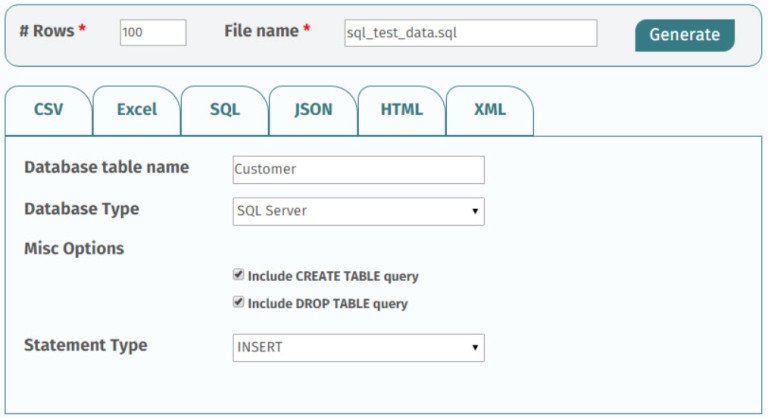
Building robust applications capable of withstanding real-world chaos requires more than just clean code; it demands rigorous testing against data that truly reflects user behavior and potential edge cases. This is where the often-overlooked art of Generating Test Data for Forms & Databases becomes your secret weapon. Without realistic, varied test data, you're essentially testing your fortress with a toy sword, leaving your application vulnerable to unexpected bugs, performance bottlenecks, and costly production failures.
Think of it this way: your application is only as strong as the data it processes. Whether it's a simple signup form, a complex e-commerce checkout, or a vast analytical database, the quality of your test data directly dictates the reliability of your software. Modern test data management isn't just a best practice; it's a strategic investment that can reduce software testing costs by 5-10% and boost test coverage by up to 30%. It's about moving beyond the "happy path" to confidently explore the dark corners of your application.
At a Glance: Your Test Data Playbook
- Why It Matters: Test data is crucial for uncovering hidden bugs, ensuring app resilience, and building developer confidence. It boosts coverage and reduces costs.
- Key Strategies:
- Synthetic Data: Create data from scratch using libraries like Faker, ideal for unit and focused integration tests.
- Database Seeding: Populate your database with structured, interconnected data for consistent integration and end-to-end tests.
- Traffic Shadowing: Replay anonymized real-world user requests to catch "unknown unknowns" from production.
- Automation is Key: Integrate test data generation into CI/CD pipelines for reproducible, consistent results across all environments.
- Choose Your Tools Wisely: Specialized generators and data management platforms offer robust features for masking, scaling, and compliance.
- Commit Scripts, Not Data: Store the logic for generating data in version control, not the bulky data files themselves.
- Prioritize Anonymization: When using real data, rigorously scrub all PII and sensitive information to ensure privacy and compliance.
Why Test Data Isn't Just "Nice to Have"—It's Non-Negotiable
Every line of code you write and every feature you ship is designed to interact with data. If your tests only ever see perfect, predictable, sanitized data, you're living in a fantasy. Real users make mistakes, enter unexpected characters, submit incomplete forms, and push systems to their limits. Testing solely against the "happy path"—the ideal scenario where everything works perfectly—is a recipe for disaster.
Realistic test data helps you:
- Uncover Edge Cases: What happens when a user enters 100 characters into a 10-character field? Or selects a date far in the past?
- Expose Performance Issues: How does your system perform with thousands, or even millions, of records?
- Validate Data Integrity: Does your database correctly handle relationships when data is missing or malformed?
- Ensure Compliance: Does your application properly handle sensitive information under various conditions, especially when combined with robust USA address data?
- Build Developer Confidence: Knowing your application has been battle-tested against a wide array of data scenarios allows developers to ship with greater assurance.
The goal isn't just to make tests pass; it's to make them robust enough to break your application in development, saving you from much costlier production outages.
The Many Faces of Test Data: Choosing Your Generation Strategy
When it comes to populating your forms and databases with test data, you have several powerful strategies at your disposal, each suited for different testing needs.
1. Crafting Synthetic Data with Scripts and Libraries (The "Factory" Approach)
This is your go-to method for precision and control, especially for unit and focused integration tests. Synthetic data is entirely fabricated, built from the ground up to meet specific requirements.
How It Works:
You leverage libraries like Faker.js (for Node.js) or Faker (for Python, Ruby, PHP, etc.) to generate believable, yet fake, information. These libraries can churn out everything from names, addresses, and email addresses to financial details, IP addresses, and even lorem ipsum text.
The "Factory" Pattern:
For more complex data structures, developers often use a "factory" pattern. Imagine you need to test a user profile that includes multiple posts, each with comments. Instead of manually creating these, you define a "factory" that uses Faker to build interconnected, nested JSON objects:
javascript
// Example using a hypothetical Faker-like library
const UserFactory = () => ({
id: uuid(),
name: Faker.person.fullName(),
email: Faker.internet.email(),
address: {
street: Faker.address.streetAddress(),
city: Faker.address.city(),
zip: Faker.address.zipCode(),
country: 'USA' // Maybe ensure specific country data, like a generated US address
},
posts: Array.from({ length: Faker.number.int(5) }, () => ({
id: uuid(),
title: Faker.lorem.sentence(),
content: Faker.lorem.paragraph(),
comments: Array.from({ length: Faker.number.int(3) }, () => ({
id: uuid(),
author: Faker.person.firstName(),
text: Faker.lorem.lines(),
})),
})),
});
const testUser = UserFactory();
console.log(JSON.stringify(testUser, null, 2));
This factory can quickly generate dynamic, realistic datasets, making it perfect for exploring unexpected data combinations without touching any real user information.
Best For: Unit tests, integration tests focusing on specific components, new feature development, and exploring highly specific edge cases.
2. Populating Your Database with Smart Seeding Strategies
While synthetic data is great for isolated tests, integration and end-to-end tests often require a stable, predictable database state. This is where database seeding comes in.
How It Works:
You write scripts that use Object-Relational Mappers (ORMs) like Prisma, TypeORM, or Sequelize to programmatically insert interconnected records directly into your database. The key here is to ensure referential integrity—meaning all foreign key relationships are correctly maintained.
Organizing Your Seeds:
Instead of one massive seed file, structure your seed scripts for different scenarios:
empty_state.js: For tests needing an entirely clean slate.basic_user.js: To create a few standard user accounts with minimal data.complex_permissions.js: To set up users with various roles and access levels.large_dataset.js: For performance testing with thousands of entries, including potentially diverse US addresses.
This modular approach makes your tests faster and more focused, reducing the flakiness that often plagues integration tests due to inconsistent data environments.
Best For: Integration tests, end-to-end (E2E) tests, setting up development environments, and ensuring a consistent baseline for feature testing.
3. Learning from the Wild: Replaying Anonymized Production Traffic
Sometimes, the most elusive bugs stem from the unpredictable, messy reality of real user interactions—the "unknown unknowns." Traffic shadowing or capture allows you to tap into this rich source of real-world complexity.
How It Works:
You record actual requests and responses from your production or staging servers over a period. This raw traffic is then replayed in a safe, isolated test environment. This can uncover issues like malformed JSON payloads, unexpected request parameters, or bizarre user sequences that you never anticipated. Some 34.7% of teams specifically highlight realistic test data as a key benefit of these advanced techniques.
Critical Step: The Art of Anonymization & PII Scrubbing:
This is non-negotiable. Before you ever touch captured production data in a test environment, you must scrub all Personally Identifiable Information (PII) and other sensitive data. This includes:
- Names, email addresses, phone numbers
- Authentication tokens, session IDs
- Financial details (credit card numbers, bank accounts)
- Health information (PHI)
- Any data that falls under regulations like GDPR, HIPAA, or CCPA.
The goal is to retain the structure and behavior of the requests while replacing sensitive values with safe, fake ones. Tools can help automate this, detecting common PII patterns and replacing them with synthetic equivalents. Failing to do this can lead to severe privacy breaches and legal consequences.
Example:
A captured request might contain{"user_email": "jane.doe@example.com", "credit_card": "4111-..."}. After anonymization, it becomes{"user_email": "fake.user@test.com", "credit_card": "4545-..."}. The request still looks like a real transaction, but without exposing any actual user data.
Best For: Stress testing, performance testing, finding elusive bugs that only manifest under real-world conditions, and validating system resilience against diverse inputs, potentially including varied generated US addresses.
Automate to Accelerate: Integrating Test Data into CI/CD
Manual test data generation is a bottleneck. To truly leverage the power of test data, you need to embed its creation directly into your Continuous Integration/Continuous Delivery (CI/CD) pipelines.
Why Automate?
- Reproducibility: Every test run, whether by a developer on their machine or in the CI environment, starts with the exact same data baseline. This eliminates the dreaded "it works on my machine" problem.
- Consistency: Ensures that all team members are testing against a standardized, up-to-date dataset.
- Speed: Automatically spinning up test data on demand drastically reduces setup time for new features or bug fixes.
- Reliability: Automated processes are less prone to human error than manual data entry or database restores.
How to Integrate:
Your CI/CD pipeline (using tools like GitHub Actions, GitLab CI, Jenkins, etc.) can be configured to:
- Run Seed Scripts: Execute your database seeding scripts before integration or E2E tests begin.
- Generate Synthetic Data: Trigger data factory functions to create specific synthetic datasets for individual test suites.
- Provision Mock APIs: Spin up mock API services that provide controlled, predictable responses for external services. This allows you to test your application's interactions with third-party APIs (payment gateways, weather services, etc.) without actually hitting slow, flaky, or costly live services. You can simulate perfect responses, timeouts, or specific error codes at will.
The rise of generative AI is also playing a significant role here, with 68% of organizations now using it for test automation, and 72% reporting faster processes as a result. This can extend to intelligent data generation tailored to specific test cases.
Navigating the Test Data Tool Landscape: What to Look For
While scripts and libraries are powerful, specialized Test Data Generator (TDG) tools offer advanced capabilities, especially for larger organizations and complex data environments. A TDG is software designed to automatically create large datasets for testing applications, databases, or systems, ensuring they can handle various scenarios like volume, performance, stress, and edge cases.
The Consequences of Poor Tools:
Choosing the wrong tools, or relying on ad-hoc methods, can lead to:
- Unreliable datasets and inconsistent test coverage.
- Manual fixes, rework, and wasted resources.
- Data mismatches and increased compliance risks due to ineffective masking.
- Developer frustration and reduced productivity.
Key Selection Criteria:
When evaluating TDG tools, consider these factors (based on extensive research into over 40 tools): - Ease of Use: Intuitive interface, minimal learning curve.
- Performance Speed: Ability to generate large datasets quickly.
- Data Diversity: Support for various data types, formats, and realistic variations.
- Integration Capability: APIs, plugins, and native connectors for CI/CD, databases, and other testing tools.
- Customization Options: Define your own data patterns, rules, and relationships.
- Security Measures: Robust data masking, anonymization, and subsetting capabilities for sensitive data.
- Scalability: Can it handle thousands to millions of records efficiently?
- Cross-Platform Support: Compatibility with various operating systems, databases (SQL, NoSQL), and application types.
- Value for Money: Balancing features with cost, considering licensing models.
Addressing Common Tooling Headaches:
| Issue | Solution |
| :------------------------------- | :------------------------------------------------------------------------------------------------------------ |
| Incomplete/Inconsistent Datasets | Configure generation rules carefully, validate against schema, ensure relational consistency. |
| Ineffective Masking | Enable built-in algorithms, verify with audits, apply field-level anonymization for all sensitive fields. |
| Limited CI/CD Integration | Choose tools with REST APIs/plugins, configure DevOps integration, schedule automated provisioning. |
| Insufficient Volume | Configure large dataset generation with sampling, use synthetic data expansion, cover peak load scenarios. |
| Licensing Restrictions | Opt for enterprise licensing for broader access, use shared repositories, assign role-based permissions. |
| Confusing Interfaces | Utilize vendor documentation, in-tool tutorials, and internal training programs. |
| Poor Unstructured/NoSQL Handling | Select tools supporting JSON, XML, NoSQL; validate data structure mappings. |
| Freemium/Free Plan Limitations | Upgrade to paid tiers for full features or combine multiple free datasets with custom scripts. |
Top Test Data Generators: A Curated Selection
While the perfect tool depends on your specific needs, here are some top contenders with their standout features:
- EMS Data Generator: An intuitive tool for synthetic data creation across database tables. Good for schema-based generation and supports complex data types like JSON, ENUM, SET, and GEOMETRY.
- Informatica Test Data Management (TDM): An advanced solution strong on compliance. It offers automated sensitive data identification and masking, data subsetting, pre-built accelerators, and AI-driven data intelligence. Has a steep learning curve but is powerful.
- Doble: Focuses on structured test data management with strong supervisory oversight and data governance features, including standardized processes and a Database API for BI integration.
- Broadcom EDMS: A powerful platform for schema-based, rule-driven datasets. Features include a unified PII scan/mask/audit, scalable masking (Kubernetes), NoSQL support (MongoDB, Cassandra), and self-service portals, balancing security and flexibility.
- SAP Test Data Migration Server: Specifically designed for SAP test data, offering efficient generation and migration, data selection parallelization, and GDPR-compliant data scrambling.
- Upscene – Advanced Data Generator: Creates realistic, schema-based datasets with an advanced generation logic (macros, multiple passes) and expanded multilingual data libraries. Excellent for simulating complex, multi-table data.
- Mockaroo: A flexible online tool for generating mock data in various formats (JSON, CSV, Excel, SQL). Excellent for quick API prototyping, creating custom schemas, and simulating edge cases with high scalability.
- GenerateData: An open-source (PHP, MySQL, JavaScript) solution for generating interconnected, location-specific data. Versatile with 30+ data types and multi-format exports but may struggle with enterprise-level scale.
- Delphix: A powerful platform for virtualizing data environments, enabling secure synthetic datasets and masked production data. Offers error bookmark sharing, robust data compliance (GDPR, CCPA), and extensible APIs for CI/CD integration, with version control and reset capabilities.
- Original Software: Provides a comprehensive approach for both database and UI testing, featuring vertical data masking, checkpoint restore, 20+ data validation operators, and requirement traceability/coverage for deep insights.
Your Burning Questions, Answered
Let's tackle some common dilemmas developers face when generating test data.
How much test data do I really need?
It depends entirely on the type and scope of your test:
- Unit Tests: A handful of objects or records. You're testing a single function or component in isolation.
- Integration Tests: A few realistic accounts with related data (e.g., a user, their profile, a few orders). Enough to verify interactions between components.
- End-to-End (E2E) Tests: Similar to integration tests, but potentially covering more scenarios with varied data, including specific US addresses if your app is location-aware.
- Performance/Stress Tests: Thousands, millions, or even billions of records. The goal is to push the system to its limits and identify bottlenecks under load.
Start small and scale up. Focus on achieving adequate test coverage for your scenarios rather than an arbitrary volume of data.
Synthetic vs. Anonymized Production Data: Which is right for me?
Each has its strengths:
| Feature | Synthetic Data | Anonymized Production Data |
|---|---|---|
| Realism | Good, based on assumptions and patterns. | Highest, reflects actual user behavior and unexpected inputs. |
| Privacy | Inherently safe, no real PII involved. | Requires robust anonymization; high risk if done incorrectly. |
| Edge Cases | Excellent for specific, known edge cases. | Reveals "unknown unknowns" and real-world complexities. |
| Setup Speed | More upfront scripting to define patterns. | Quicker setup with good tooling for capture/anonymization. |
| Use Cases | New features, specific conditions, controlled tests. | Finding elusive bugs, stress testing, validating robustness. |
| Use synthetic data when you need precise control over specific conditions or are developing new features. Turn to anonymized production data when you're seeking to uncover real-world complexities, validate system resilience, or perform high-fidelity performance testing. |
Should I commit my generated test data to Git?
Generally, no.
Committing large test data files directly into your Git repository will quickly bloat its size, slow down cloning and pushes, and make version control cumbersome. Instead, commit the scripts that generate the data (e.g., your seed scripts, data factory files, or configurations for your TDG tool).
This approach ensures:
- Reproducibility: Anyone can run the scripts to generate the exact same dataset.
- Version Control: The logic for data generation is tracked, not the volatile data itself.
- Efficiency: Your repository remains lean, and data is generated on demand.
The only exception might be very small, static mock files (e.g., a tiny JSON response for a specific unit test) that are explicitly part of your codebase and don't change frequently.
Building a Strong Foundation: Next Steps for Robust Test Data
Generating test data for forms and databases isn't a one-time task; it's an ongoing commitment to software quality. By embracing a strategic approach—combining synthetic data generation, smart database seeding, and careful anonymization of real traffic—you empower your development and QA teams to build applications that are truly robust, resilient, and ready for the unpredictable demands of the real world.
Start by assessing your current testing gaps. Are you missing edge cases? Experiencing flaky integration tests? Struggling with performance bottlenecks? Choose the strategy or tool that best addresses your most pressing needs, and gradually integrate more sophisticated test data practices into your development lifecycle. Your users, and your team, will thank you for it.